
Note-You are unable to click on the "view report" button and Export the reports in the basic report. So you cannot get the detailed insights.
Go to the "Reports" on the admin panel.

You will see the reports window with 4 types of reports.

View Sales reports by Customers in the Basic Plan
You will see total 2 terms in the sales report by Customers and are explained below:
Total orders-Total number of orders placed by the customers.
Amount spent-Total amount spent on the orders including shipping.

You can set the filter to view the reports for a specific time length.

Click on the "clear" button to remove the filter.

View Sales reports by customers in the Advanced plan
Click on the" view report" button.

You will see a detailed page as shown below.
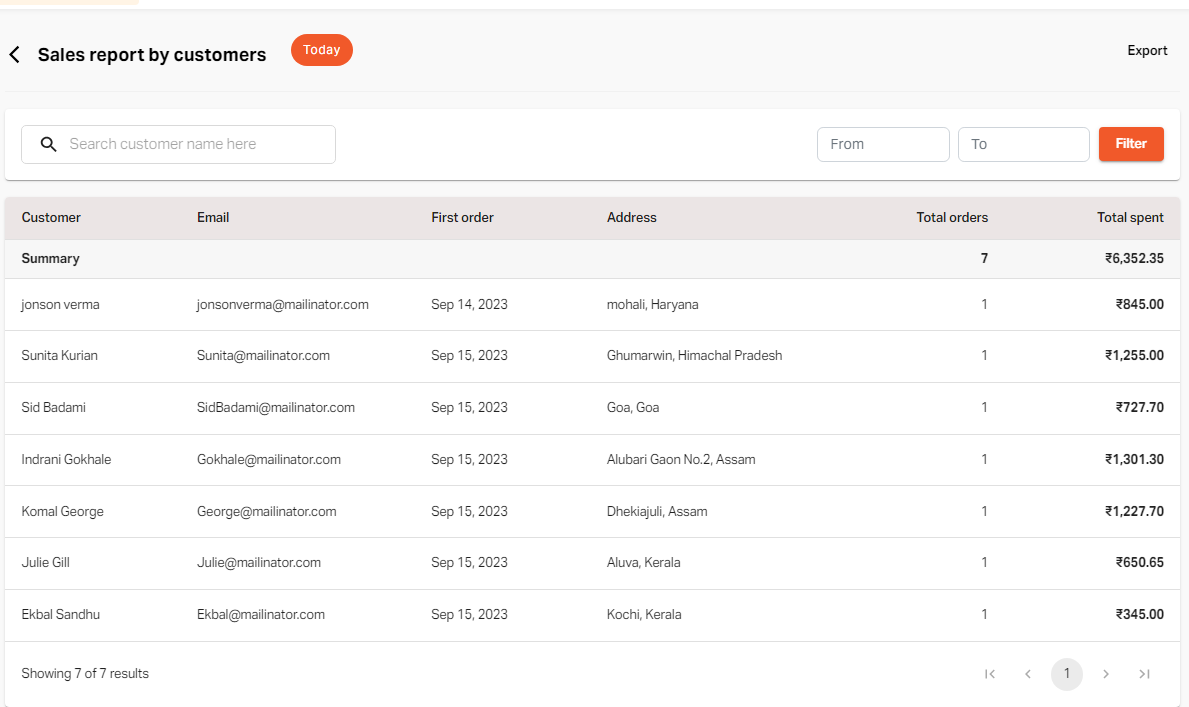
You can search for a particular customer in the search bar to view the sales details.

Set the "From" and "To" date and click on the "Filter" button.

Click on the "clear" button to remove the filter.

To Export the report, click on the "Export" button.

If you still can't find an answer to what you're looking for, or you have a specific question, open a new ticket and we'd be happy to help!
Contact Us